
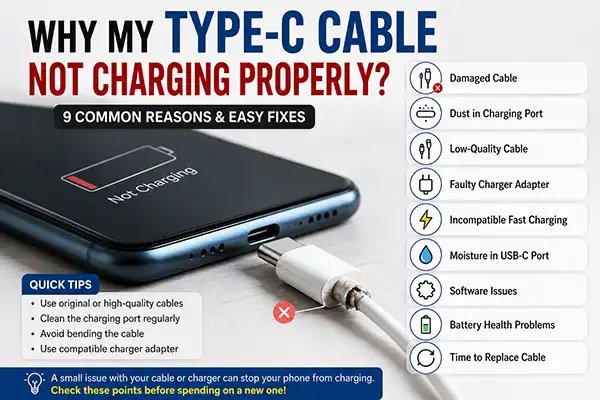
Why My Type C Cable Not Charging Properly?
You plug in your phone expecting it to charge, but nothing happens. Sometimes it starts charging and stops after a few seconds. In other cases, the phone charges painfully slowly even though you’re using a fast charger.
If you’ve faced this problem, don’t rush to buy a new cable. In many cases, the issue isn’t the cable alone.
Let’s find the most common reasons and how you can fix them.
1. Your Type-C Cable May Be Damaged
The outside of the cable can look perfectly fine while the wires inside have already started breaking.
This usually happens because the cable is bent repeatedly near the connector or pulled out by the wire instead of the plug.
Common signs
- Charging starts and stops.
- Cable works only at a certain angle.
- Phone disconnects frequently.
- No longer enables fast charging.
If you notice these signs, replace the cable with new one is the safest option.
2. Dust Inside the Charging Port
This is one of the most ignored reasons.
Phones stay in pockets, bags, and cars all day. Dust and lint slowly collect inside the charging port and its cause gap in between the port and cable .
Before replacing your cable, check the charging port carefully.
Clean with soft brush or a wooden toothpick. Never use metal pins because they can damage the charging pins.
3. Low-Quality Charging Cable
All Type-C cable may look similar, but they don’t perform the same as original cable.
In Cheap cables use low quality materials, which can lead to:
- Slow charging
- Frequent disconnections
- Overheating
- Poor durability
Since we charge our phones every day, it’s always worth choosing a good-quality Type-C cable instead of the cheapest one.
4. Your Charger Could Be the Real Problem
Before replacing your Type-C cable, take a moment to check the charger as well. Sometimes the adapter is the real problem, not the cable. The easiest way to find out is by using the same cable with a different charger. If your phone starts charging normally, you’ve found the issue—the adapter needs to be replaced.
5. Fast Charger + Normal Cable = Slow Charging
Fast charger alone cannot deliver fast charging.
The cable must also support higher charging speeds.
Using an older or Normal cable with a fast charger deliver slow charging speed than expected.
6. Moisture Detection Can Stop Charging
Water or moisture inside the charging port can interrupt charging on many modern smartphones. If your phone displays a moisture warning or refuses to charge after getting wet, unplug the charger and allow the port to air dry completely before trying again.
7. Software Can Also Cause Charging Issues
Sometimes the problem isn’t hardware.
After a software update, charging behaviour may temporarily change.
Restart your phone, install any pending updates, and check whether fast charging is enabled in your battery settings.
8. Battery Health Matters
If your phone is several years old, the battery itself may be responsible.
Common symptoms include:
- Battery percentage increases very slowly.
- Phone heats up while charging.
- Battery drains quickly after charging.
If multiple cables behave the same way, it may be time to have the battery checked.
9. When Should You Replace Your Type-C Cable?
Consider replacing the cable if:
- It charges only at one angle.
- The connector has become loose.
- The cable heats up unusually.
- Charging repeatedly disconnects.
- Fast charging has stopped working.
A good-quality cable is not only more reliable but can also help protect your phone from charging-related issues.
How to Choose a Good Type-C Cable
Before buying a new cable, look for these features:
- Fast charging support
- Strong connector design
- Durable outer jacket
- Quality copper wiring
- Reliable data transfer
- Good build quality
- Warranty, if available
Buying a better cable once is usually more economical than replacing a cheap cable every few months.
Quick Tips to Make Your Cable Last Longer
- Pull the connector, not the wire.
- Avoid bending the cable sharply.
- Keep the charging port clean.
- Store the cable loosely instead of wrapping it tightly.
- Don’t leave the cable plugged in unnecessarily.
Frequently Asked Questions
Can a damaged Type-C cable damage my phone?
A poor-quality or damaged cable can cause unstable charging and overheating. It’s best to replace a faulty cable rather than continue using it.
Why does my phone charge only at a certain angle?
This usually indicates a damaged cable or a loose charging port.
Why is fast charging not working anymore?
The cable, charger, charging port, or phone settings could all be responsible. Test each component one by one.
How long should a Type-C cable last?
With normal use and proper care, a quality Type-C cable can last between one and three years.
Final Thoughts
Charging problems don’t always mean your phone is faulty. In many cases, the issue is something simple like dust in the charging port, a worn-out cable, or an incompatible charger.
Checking these basic things first can save both time and money. If the cable is damaged or no longer supports stable charging, replacing it with a good-quality Type-C cable is the most practical solution.
Looking for Quality Type-C Cables in Bulk?
If you own a mobile shop, wholesale business, or retail store, CellToPhone offers a wide range of Type-C charging cables suitable for daily use and bulk orders. Explore our collection or contact us on WhatsApp for wholesale pricing.